Which of your Jamf Pro scripts still call python? Which extension attributes use a binary that Apple is
removing? Answering that by hand means opening them one by one.
Jamf Search - Scripts & EAs answers it in one search. It is a native macOS app that looks for a string across all scripts and computer extension attributes in a Jamf Pro instance. Version 1.0.0 is the first release.
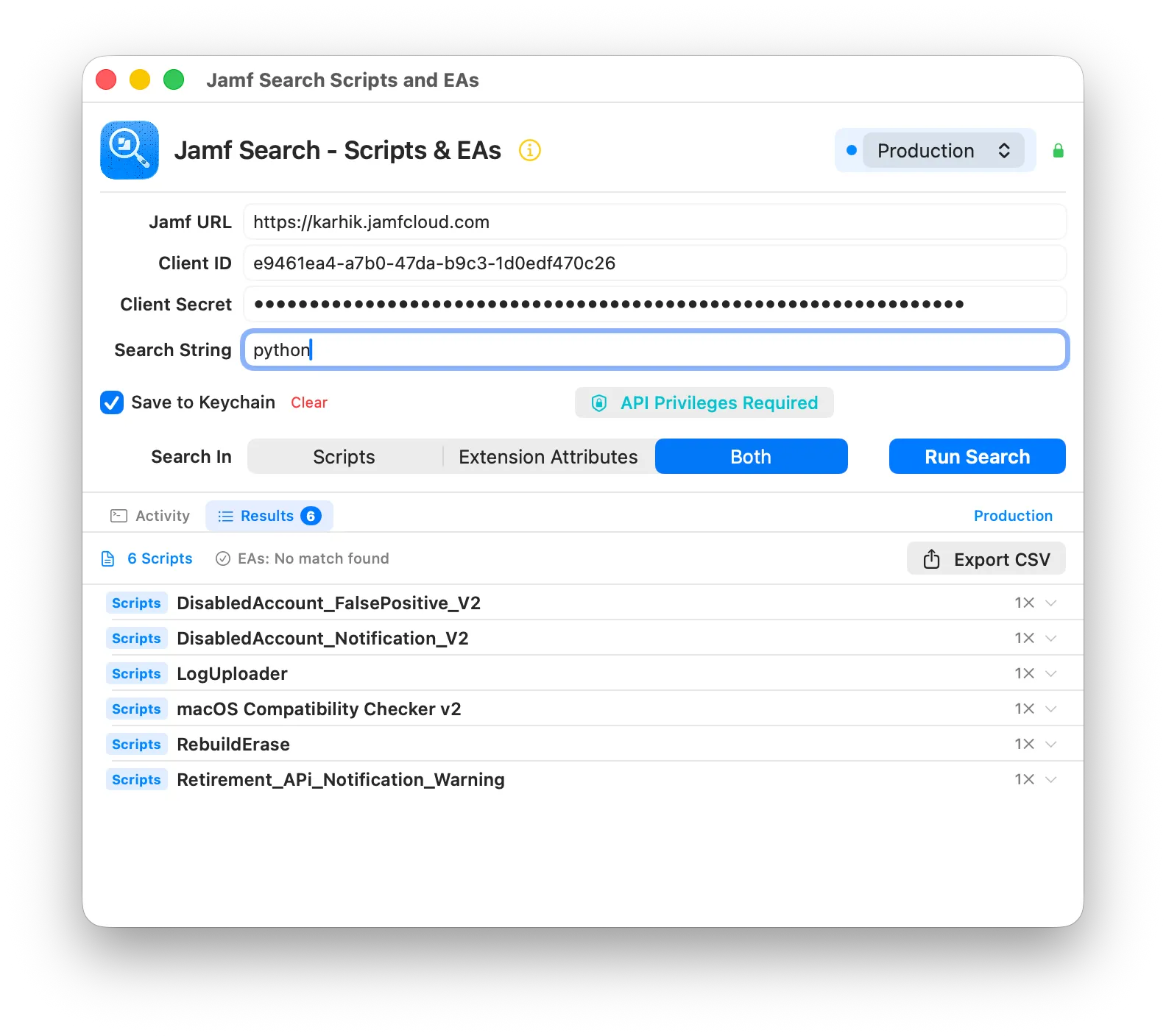
What it does
- Text search. Case-insensitive, literal string matching across scripts and extension attributes.
- Scope. Search scripts only, extension attributes only, or both.
- Results with detail. Each match shows the resource, the line numbers and the number of matches.
- CSV export, for reporting.
- Two environments. Switch between Production and Sandbox, each with its own saved credentials.
- Activity log. Search progress as it happens, which you can copy.
It is useful for auditing deprecated commands, finding scripts that use a particular binary, and tracking down hard-coded paths.
Setup
The app needs macOS 14 or later, and Jamf Pro 10.49 or later for API Client authentication.
In Jamf Pro, go to Settings → System → API Roles and Clients and create:
- An API Role with two privileges: Read Scripts and Read Computer Extension Attributes.
- An API Client that uses that role. Copy the client ID and the client secret.
Then in the app:
- Choose Production or Sandbox.
- Enter your Jamf URL, client ID and client secret.
- Turn on Save to Keychain if you want the credentials remembered.
- Type a search term such as
pythonor/usr/bin/python3, choose the scope, and click Run Search.
Security
- The app is sandboxed, signed with an Apple Developer ID and notarised by Apple.
- It uses OAuth client credentials, and revokes the access token after each search.
- Saved credentials are stored in the macOS Keychain, separately for each environment.
- It has no telemetry or analytics.
You can check the signature yourself:
codesign -dv "Jamf Search Scripts and EAs.app"
spctl -a -v "Jamf Search Scripts and EAs.app"
Troubleshooting
- Authentication fails: check the client ID and secret in Jamf Pro.
- Access denied: the API Role is missing one of the two read privileges.
- The Activity tab shows detailed errors.
Get it
Download the app from the v1.0.0 release, unzip it and move it to Applications. The source is in the JamfScriptsEAsStringSearch repository.
Jamf Search - Scripts & EAs is not affiliated with, endorsed by, or sponsored by Jamf. Thanks to the Mac Admins India and Jamf Nation communities for feedback and testing.