Selling or retiring a Mac should not need a Jamf admin and a dozen manual steps.
When a Mac is sold, retired or reimaged, someone has to clear the Recovery Lock and then erase it. Done by hand in Jamf Pro, that means:
- giving the whole technician or first-line team broad Jamf access
- sending two MDM commands in the right order
- hoping nobody picks the wrong Mac, or one that is not even managed
This is a real use case I rolled out recently. The fix is an erase assistant in Self Service, built with swiftDialog.
recovery-lock-clear-and-erase-by-serial.sh is part of
Mac Admins Toolkit. It clears the Recovery Lock, erases, or does both, on an
Apple silicon Mac that is managed in Jamf Pro. Technicians never need access to the Jamf console, and one
wrong serial number no longer means the wrong Mac.
The important detail is where it runs. It runs on an admin’s or technician’s own Mac, as a Jamf Self Service policy. They type the serial number of the Mac to erase. The script does not run on the Mac being erased.
Background: Recovery Lock
Apple’s deployment guide says a Mac with Apple silicon running macOS 11.5 or later supports a recoveryOS
password set by a device management service, and that the password can only be set, updated or removed
through that service. Jamf Pro sends it as the SET_RECOVERY_LOCK MDM command. This script sends that
command with an empty password to clear the lock, following Jamf’s article
Recovery Lock Enablement in macOS Using the Jamf Pro API.
What a run looks like
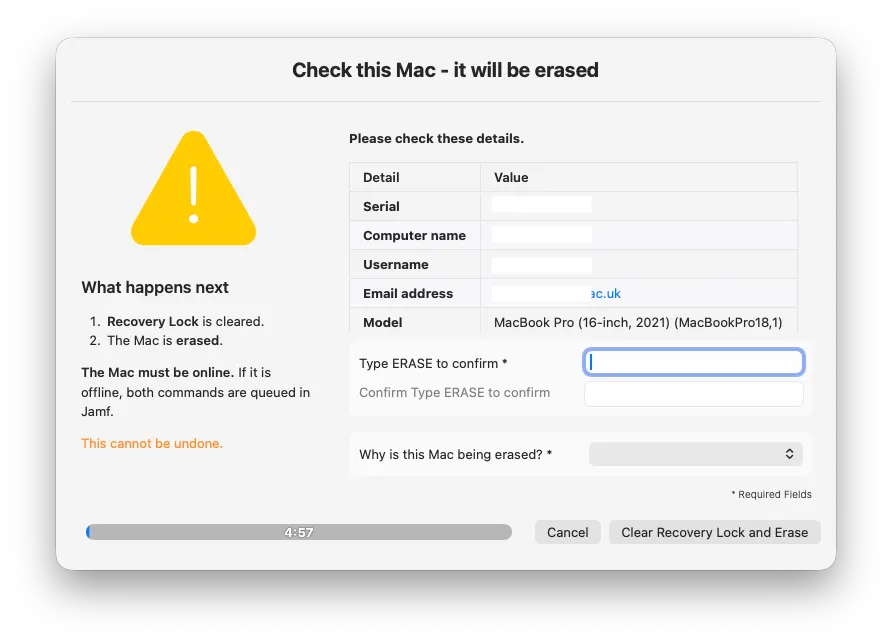
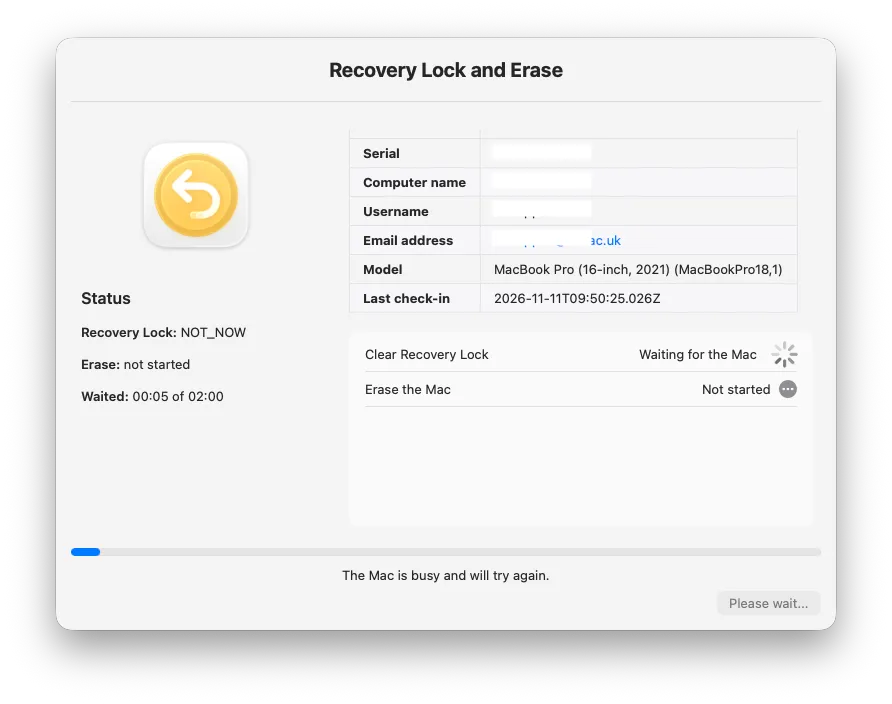
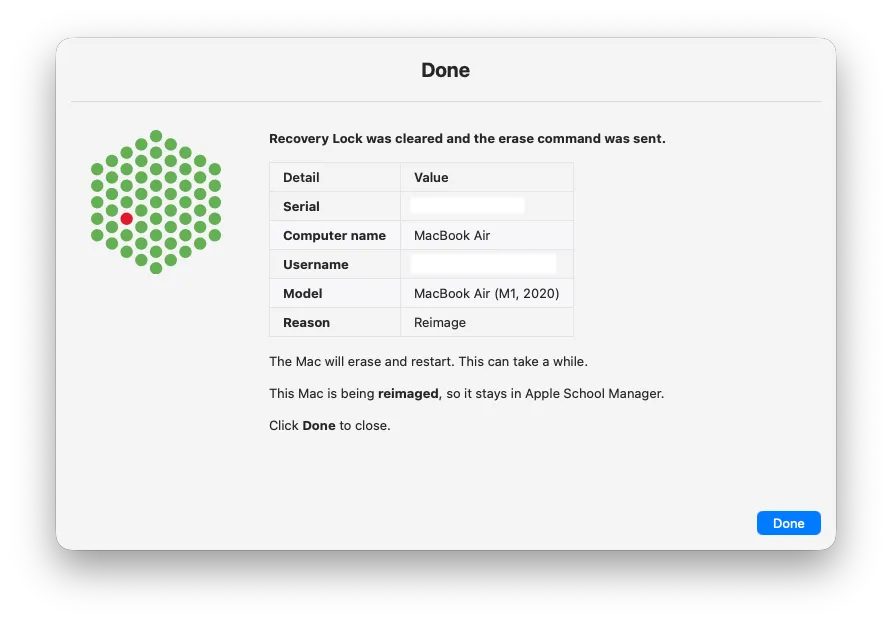
Every window is swiftDialog.
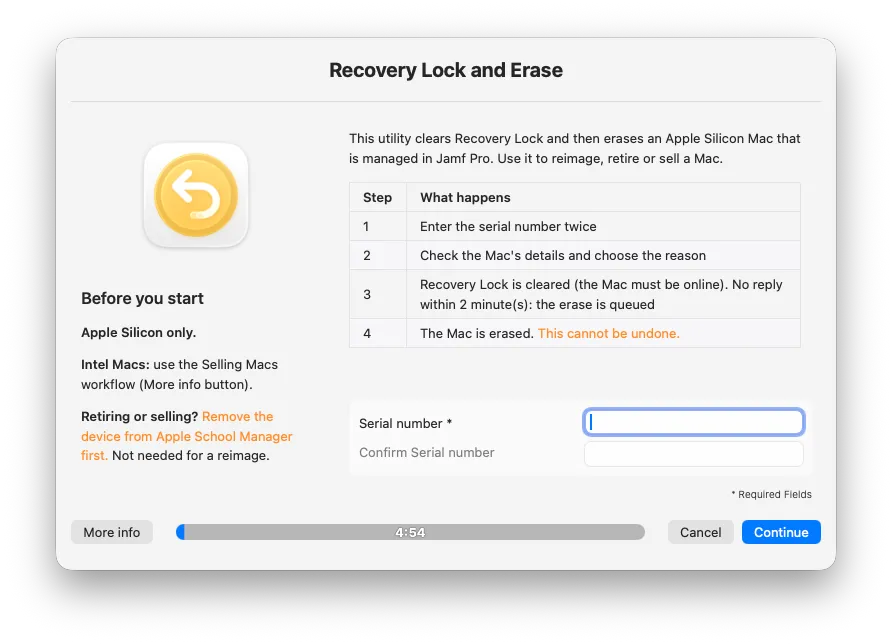
- The script asks for the serial number twice.
- It finds the Mac in Jamf Pro and shows its name, username, email, model and last check-in.
- The admin or technician picks a reason (reimage, or retired or sold) and types
ERASE. - It sends the Recovery Lock command and checks its state every 15 seconds, for up to 2 minutes.
- It sends the erase command. If the Mac is offline, the erase is queued in Jamf behind the Recovery Lock command.
- It shows the result and writes the run to a log in
~/Library/Logs. - If a webhook is set, it posts the final status to Slack, Microsoft Teams or both.
Three modes
Two variables in the script choose the job:
SCRIPT_CLEAR_RECOVERY_LOCK |
SCRIPT_ERASE_DEVICE |
Result |
|---|---|---|
yes (default) |
yes (default) |
Clear Recovery Lock, then erase |
yes |
no |
Clear Recovery Lock only. The Mac is not erased |
no |
yes |
Erase only. Recovery Lock is not touched |
no |
no |
Error. The script stops and changes nothing |
This lets you make single-purpose policies: a full retire or reimage, a Recovery Lock clear for when a Mac has to be handed over without wiping it, or an erase for a Mac whose Recovery Lock is not set. Create a separate Self Service policy for each and limit it to the right user group, so every team gets only the action it needs.
Safety controls
The policy can erase any Apple silicon Mac in Jamf Pro, so the script is deliberately cautious.
- Nothing is sent unless
SCRIPT_DRY_RUNis set tonoin the script. The default is a dry run that only shows details. - Exactly one computer record must match the serial. No match, or duplicate records, stops the script.
- The Mac must be managed in Jamf Pro. An unmanaged record stops the script before any command is sent.
- An Intel Mac is not changed. The window points to your own procedure instead.
- When both actions are on, the erase is sent only if Recovery Lock was acknowledged, or the command is still pending at the end of the wait (for example the Mac is offline). An error means no erase.
- The question windows close with nothing changed if left unanswered.
Setting it up
You need:
- A Jamf Pro API client whose role has only these privileges: Read Computers, View MDM command information in Jamf Pro API, Send Set Recovery Lock Command and Send Computer Remote Wipe Command. Confirm the names in your Jamf Pro version.
- On the admin or technician Mac: macOS 15 or later, a logged-in user, swiftDialog at
/usr/local/bin/dialogand network access to Jamf Pro. - The Mac to erase: Apple silicon, enrolled and MDM managed in Jamf Pro.
Then:
- Add the script under Settings > Computer Management > Scripts and label parameters 4 to 9.
- Create a policy with the script. Trigger: Self Service only. Frequency: Ongoing.
- Fill in the parameters.
| Parameter | Setting | Required |
|---|---|---|
| 4 | Jamf Pro URL | Yes |
| 5 | API Client ID | Yes |
| 6 | API Client secret | Yes |
| 7 | Intel Mac article URL, shown behind the More info button | No |
| 8 | Slack webhook URL | No |
| 9 | Microsoft Teams webhook URL | No |
Policy parameters are visible in Jamf policy logs. Use a limited role and rotate the secret if it is exposed.
Slack and Microsoft Teams alerts
Both are optional. Use either one, both or neither. Each posts one alert per run with the final status: done, queued in Jamf because the Mac did not reply, or failed, with the problem shown. Dry runs, and runs cancelled before the confirmation, post nothing.
| Service | Parameter | Webhook | Message |
|---|---|---|---|
| Slack | 8 | Slack or GovSlack incoming webhook | Colour-coded message |
| Microsoft Teams | 9 | Teams or Power Automate webhook, starting with https:// |
Adaptive Card |
The Slack message uses the same format as Jamf Pro Slack Notifications, which also describes how to create the webhook. The Teams card carries the same details and status as the Slack message.
- Alerts are best effort. If Slack or Teams cannot be reached, the script logs a warning and carries on.
- A webhook URL is a credential. It appears in policy logs, so rotate it if it is exposed.
- The alerts contain a person’s name and email address. Use a channel whose members may see them.
- The admin and technician Macs need network access to the webhook host.
Limitations to know about
- One serial number per run.
- The erase is sent without Return to Service, so the Mac comes back unmanaged. Activation Lock is not touched.
- Release the Mac from Apple School Manager or Apple Business Manager before the erased Mac goes online, or it shows the enrolment prompt again. Deleting the record from Jamf Pro is also left to you.
- The script confirms that Jamf accepted the erase command, not that the erase finished.
- In erase-only mode, how a Mac that has a Recovery Lock password reacts to the erase was not tested.
- Jamf Pro requires a six-digit PIN on the erase command, although its API reference does not say so. The script sends a random one, which is never shown or logged. Apple silicon does not use it.
Get it
The script and its README are in Jamf-Pro-Recovery-Lock-Clear-and-Erase. A separate tool in the same repository, Jamf-Pro-Recovery-Lock-API, sets or clears Recovery Lock from a Jamf policy on the managed Mac itself.
Thanks to Bart Reardon’s swiftDialog project, which makes admin-facing workflows like this easy to build.