AxM Jamf Sync pulls warranty and AppleCare coverage from Apple Business Manager and Apple School Manager and writes it into Jamf Pro. Version 3.2 does two things: newly added devices no longer wait for the device cache to expire, and the app can now check Activation Lock status.
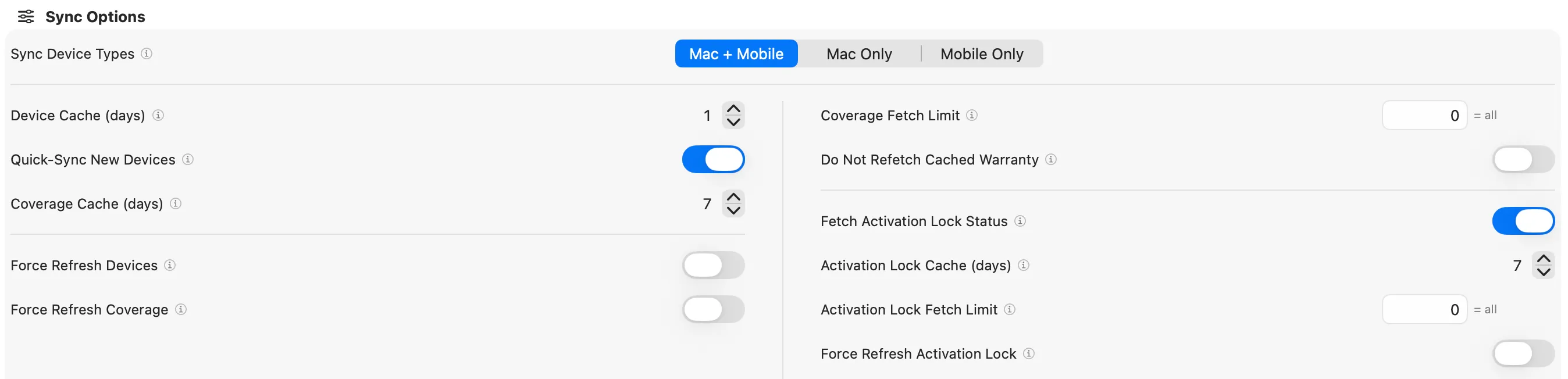
Quick-Sync New Devices
Until now, while the device cache was still valid, a sync skipped the Apple device download altogether. A device added to your organisation in that time stayed unknown to the app until the cache expired.
From 3.2, the app instead asks Apple only for devices added since the last check, with a one-day overlap. It uses the date-added filter on Apple’s device list. When there are new devices, the same run:
- Saves them to the cache and gets their MDM server assignment
- Fetches their AppleCare coverage
- Refreshes the Jamf inventory, if any of them are not in the cache at all, so they can be matched
- Writes warranty data back to Jamf Pro for the ones it matches
On a typical day this is a single small request that returns nothing new. The log tells you which way it went:
Step 1/4 — Quick sync: no new devices (N recently added device(s) already in cache).
Step 1/4 — Quick sync: N new device(s) added to cache.
It is on by default. The switch is Setup → Sync Options → Quick-Sync New Devices. It is greyed out when Device Cache is 0 or Force Refresh Devices is on, because every sync is already a full download then.
A quick sync does not reset the device cache timer, so full downloads happen as often as before. If Apple rejects the quick check, for example because a tenant is not yet on the newer API, the sync logs a warning and carries on.
Activation Lock status
The second addition is an optional step that asks Apple for each device’s Activation Lock state.
| Status | Meaning |
|---|---|
| MDM Locked | Activation Lock is on, set by MDM |
| User Locked | Activation Lock is on, set by a user |
| Not Locked | Activation Lock is off |
| Unknown | Apple has no status for the device |
It is off by default, because it costs one Apple API call per device. Turn it on under Setup → Fetch Activation Lock Status.
| Setting | What it does |
|---|---|
| Activation Lock Cache (days) | How long a result stays valid. Default 7. 0 checks on every sync |
| Activation Lock Fetch Limit | Most devices checked in one run. 0 means all |
| Force Refresh Activation Lock | Re-checks every device on the next sync, then turns itself off |
The step runs after coverage, follows Sync Device Types, and works in scheduled and --silent syncs.
Devices that have never been checked go first. Once there are none left, results older than the cache period
are checked again. It is skipped while an interrupted Apple device download still has pages left.
The status is display-only. Nothing about Activation Lock is written to Jamf Pro.
Where it shows
The Apple dashboard has a new Activation Lock card once any device has been checked. Click a legend row to open those devices in the Devices tab. The Apple dashboard filters also gain an Activation Lock menu, including Not Fetched for devices that have not been checked.
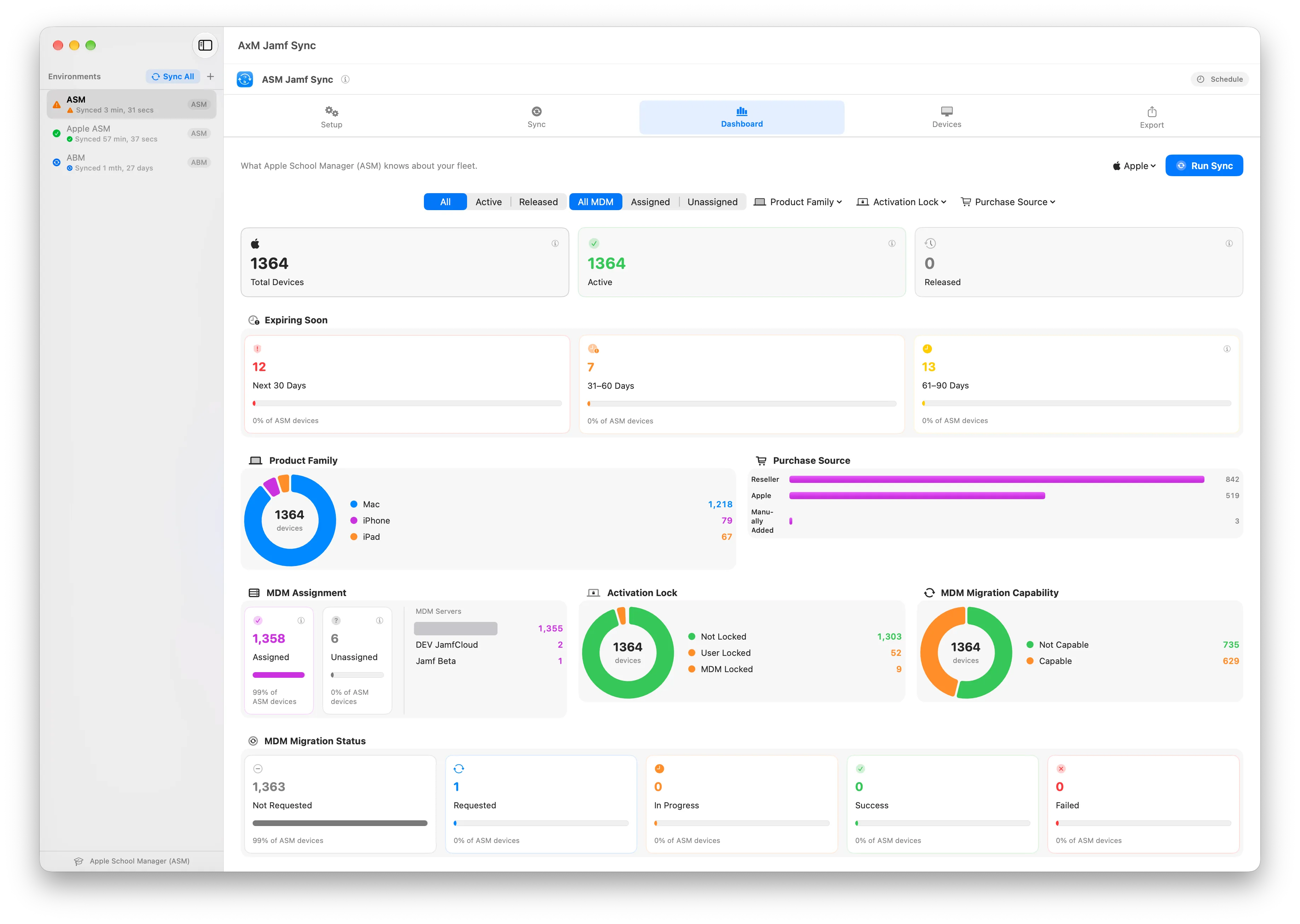
Each device’s detail panel shows its state next to coverage.

A steadier log window
The live log window now stays responsive during long, verbose syncs. It draws only the newest 400 lines, while search and the counts still cover the full buffer.
Upgrading
No action is needed. Credentials, cache and preferences carry over. On first launch the app upgrades its device database once to add the Activation Lock fields, keeping your devices, coverage data and Jamf links.
Download version 3.2 from the release page. For command-line mode and the 3.1 changes, see AxM Jamf Sync 3.0.