Version 1 of AxM Jamf Sync connected one Apple Business Manager or Apple School Manager organisation to one Jamf Pro server. That is not enough if you manage a production and a test Jamf instance, a business and a school tenant, or several clients. Version 2.0 fixes that with environments.
Environments
An environment is one complete setup: ABM or ASM credentials, a Jamf Pro server, a device cache and a log file. You can create as many as you need and switch between them from a new sidebar.
Each environment is fully isolated from the others:
| Data | Where it lives |
|---|---|
| Apple credentials | Keychain, under a key unique to the environment |
| Jamf credentials | Keychain, under a key unique to the environment |
| Device cache | Its own SQLite database |
| Sync preferences | Its own settings namespace |
| Log | Its own log file |
Migration from 1.x
The first launch after upgrading moves your existing setup into an environment called Default. Credentials, the device database, coverage results and sync history all carry over, so there is no need to sync again.
Also in 2.0
- More Jamf fields. PO number, PO date and vendor (with the purchase source ID) are written to Jamf purchasing records.
- Outside change detection. If someone edits warranty data in Jamf, the next sync detects it and restores the correct values.
- Sync Device Types per environment. Mac only, mobile only, or both.
The app is still free, open source, and signed and notarised for macOS 14 and later. Download it from the v2.0 release.
Updates in the 2.x series
Five releases followed between April and September 2026.
2.1: MDM server visibility (20 April 2026)
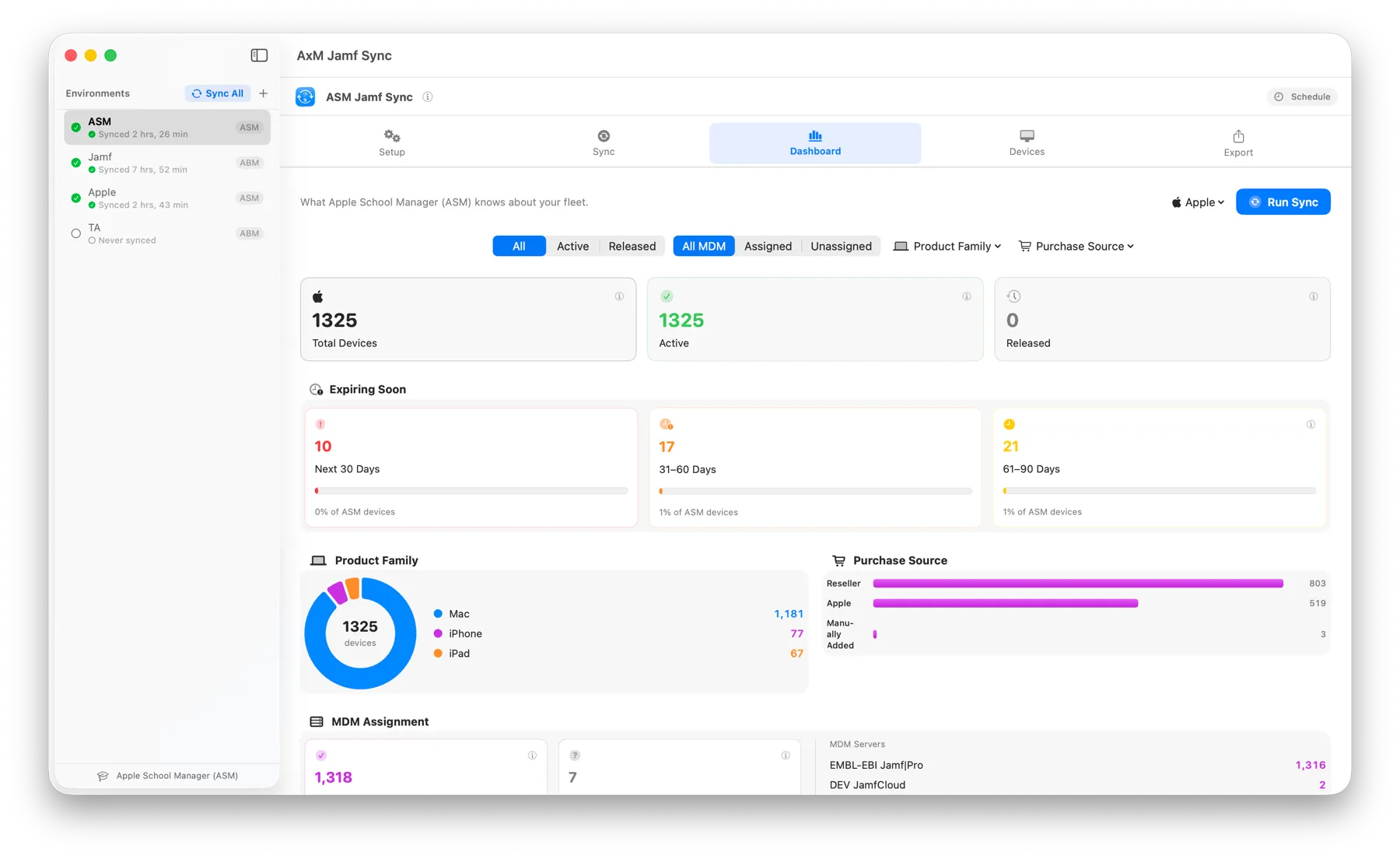
Each device now shows which MDM server it is assigned to in ABM/ASM, or Unassigned if it is registered but not assigned anywhere. You can filter by server, export it to CSV and see a per-server count on the dashboard.
The account type (ABM or ASM) is now detected from the credentials, so you no longer choose it when creating an environment. This release also stopped Apple’s token error responses from being written to the log, because they could contain the API client ID.
2.2: a sync queue (2 June 2026)
A Sync All button adds several environments to a queue in one step. Every sync, single or multiple, now runs through that one queue, one environment at a time, so there are never parallel calls to Apple’s API. You can browse the dashboard, devices and export tabs of any environment while another one syncs.
2.3: scheduling (8 September 2026)
Turn on Automatically Sync in Settings and the app runs syncs for you. The schedule builder covers minutes, hours, days, weeks and months without needing cron, and there is a raw cron field for those who prefer it. The two always stay in step.
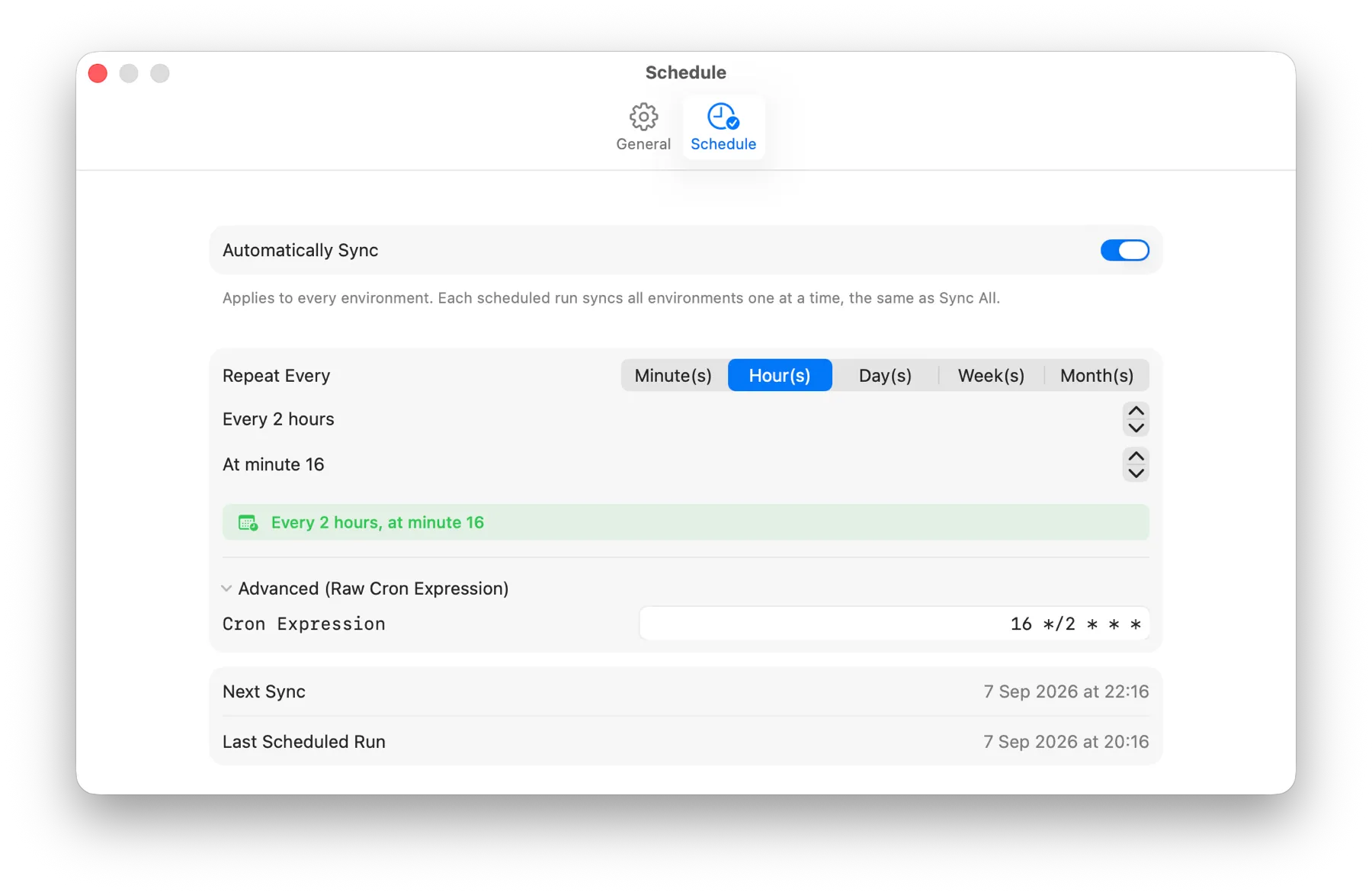
A Next Sync countdown appears in the window header and the menu bar. The app can launch at login and run from the menu bar only, with no Dock icon.
2.4: dashboard focus modes and data integrity (11 September 2026)
The dashboard became three views: Default (the combined picture), Apple (only what ABM/ASM knows) and Jamf Pro (only what Jamf knows). Every number opens the Devices tab filtered to exactly the devices it counted.
This release also documented several safety improvements:
- Cached access tokens are tied to the server and client ID they were issued for, so one environment cannot load another’s token
- After you change an environment’s Jamf URL or client ID, the saved serial-to-device mapping is checked against the new server before anything is written
- A run now ends as Success, Partial, Failed or Cancelled, instead of always looking like success
- Help → Export Diagnostics builds a zip of logs and settings for bug reports, without credentials or server hostnames
There were many smaller changes too: credentials save automatically, device search covers more fields, you can select several devices at once, and export has presets for coverage expiring in 30, 60 and 90 days.
2.5: more device data (20 September 2026)
- Wi-Fi, Bluetooth and Ethernet MAC addresses, IMEI, MEID and EID are available as export columns
- New dashboard cards for MDM migration status, MDM certificate expiry and hardware (Apple silicon or Intel, and RAM)
- OS version cards show how many devices are on the current version, one behind and two behind, worked out from the newest version in your own fleet
- Exported diagnostics now mask every serial number
- Fixed a Core Data migration bug that could stop the app opening its device database after some updates. No data was at risk.
None of the 2.x updates need manual migration.
Next in the series: AxM Jamf Sync 3.0, with a command-line mode. Previous: AxM Jamf Sync 1.0.